Case study
CloudColab
Full Stack Developer
CloudColab is a collaboration app for video meetings, live chat, and file sharing. I built it with Express for 8 API routes behind JWT and bcrypt authentication, VideoSDK for meeting rooms, Socket.IO for real-time chat, Multer and MongoDB for file uploads with session metadata, and React with Tailwind CSS for the interface.
How it’s built
CloudColab · Real-time video meeting and file-sharing collaboration app
CloudColab is a collaboration app where signed-in users start VideoSDK video rooms, chat in real time and share files inside a session. I built the Express backend with 8 POST API routes, JWT middleware, bcrypt password hashing, Multer uploads saved with MongoDB session metadata and a Socket.IO chat relay. I also built the React frontend, which uses the VideoSDK React SDK for meetings.
- Express API routes
- 8
- MongoDB models (users, files)
- 2
- Socket.IO chat events (sendMessage in, receiveMessage broadcast)
- 2
- lines of backend JavaScript
- 478
- backend commits, all mine
- 48
Technology and what it does here
- Express
- Auth, meeting, upload and file listing endpoints; also serves the built SPA
- VideoSDK
- Rooms created and validated via REST; React SDK renders the meeting
- jsonwebtoken
- Signs 10-minute VideoSDK tokens and app session tokens checked by middleware
- bcrypt
- Hashes and verifies user passwords at signup and login
- Mongoose / MongoDB
- Stores users and uploaded file records tied to a meeting session
- Multer
- Multipart disk uploads with duplicate-filename handling
- Socket.IO
- Broadcasts in-meeting chat messages to connected clients
- React 18 + Vite
- Login, signup, dashboard, meeting creation and file upload screens
- Tailwind CSS
- Frontend styling
- SweetAlert2
- Frontend alerts and confirmation dialogs
Implementation details
- A shared jwt_validator router is mounted in front of protected handlers, so token creation, room creation and uploads all require a valid app token.
- The VideoSDK token is signed server-side with HS256, a 10-minute expiry and allow_join/allow_mod permissions, keeping the VideoSDK secret off the client.
- Uploaded files are recorded with uploader id and meeting id, and a Mongo duplicate-key error (11000) returns a rename prompt instead of overwriting.
System architecture
The browser workspace uses separate paths for meetings, chat, and files. Express checks account tokens on the meeting and file routes.
Project screenshots
 Open full-size screenshot in a new tab
 Open full-size screenshot in a new tab
Results and testing
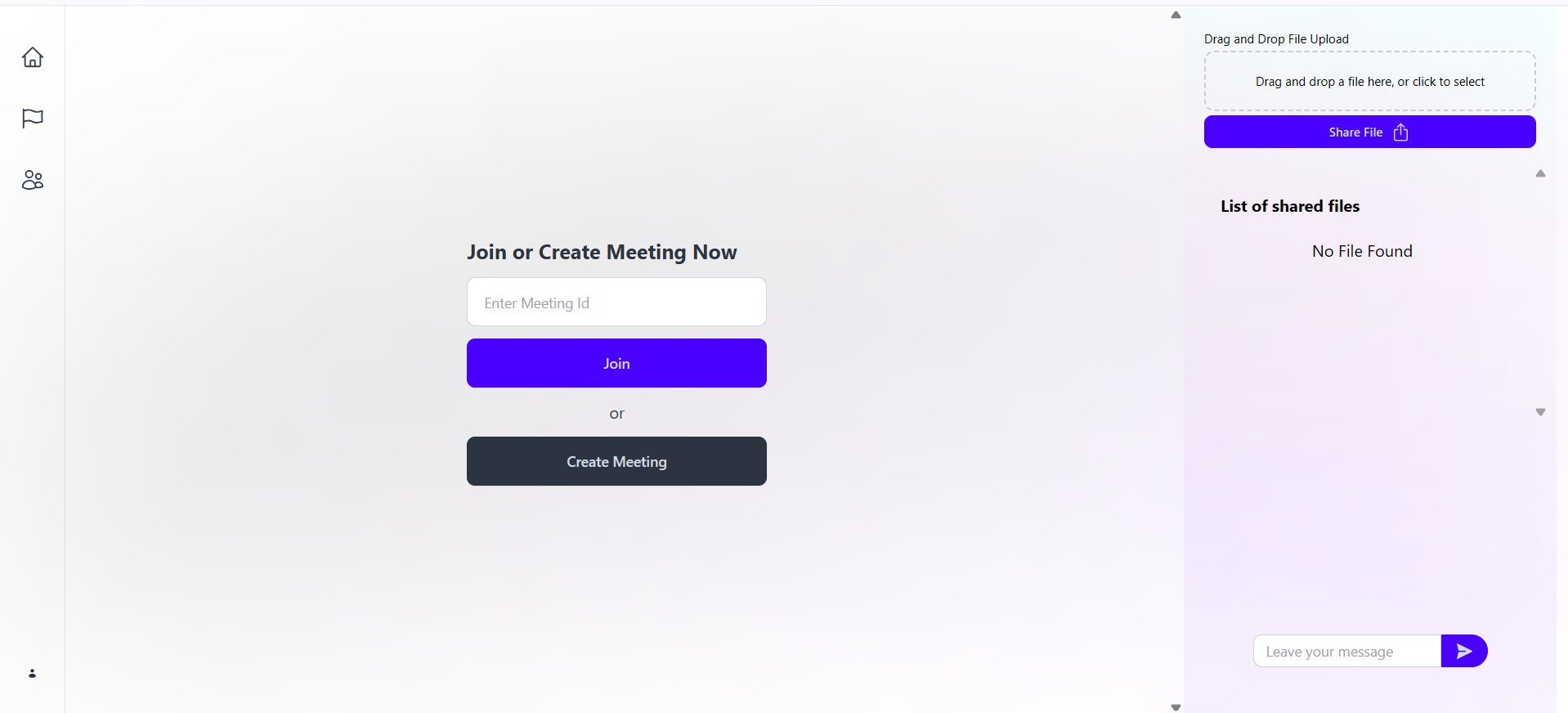
Meeting lobby with chat and file sharing
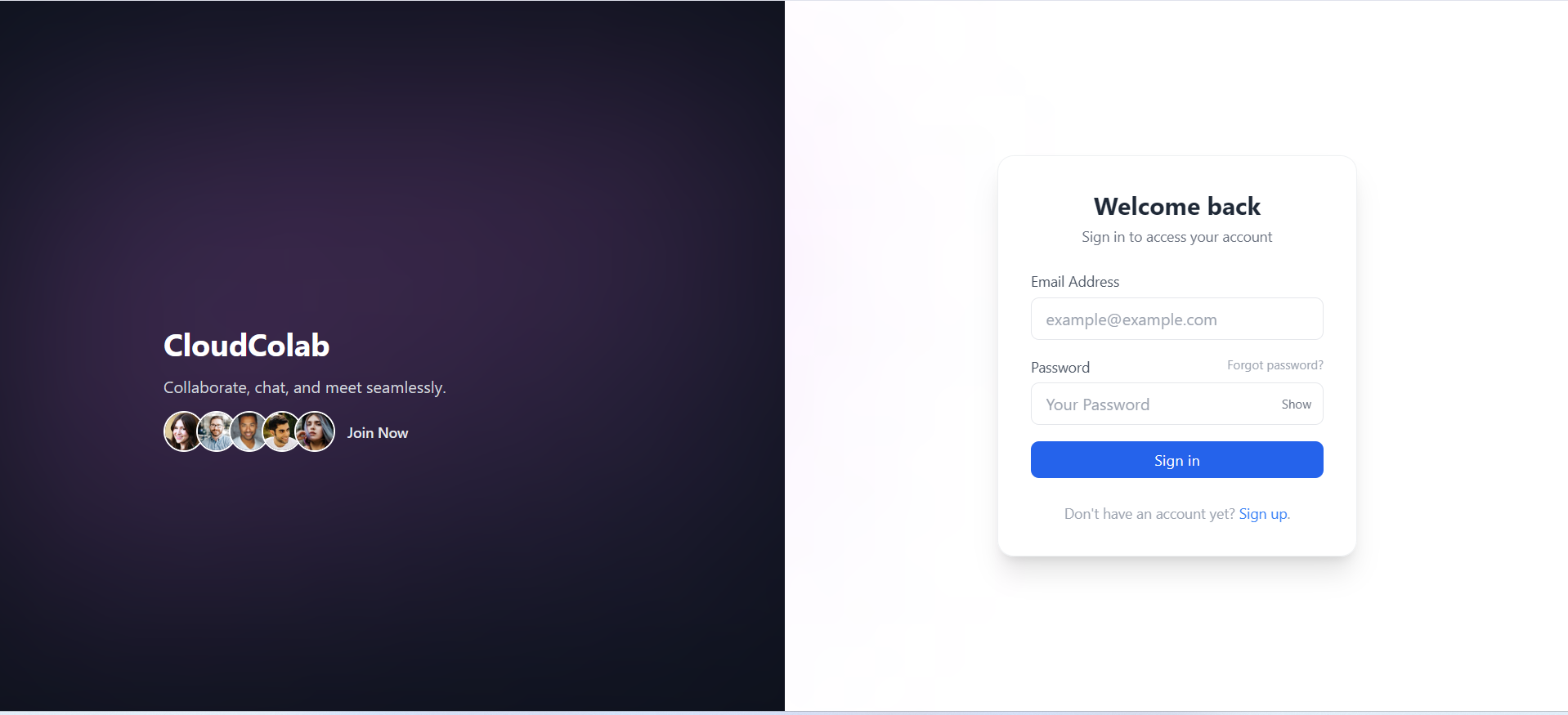
The screenshots show the meeting entry points, message composer, file upload panel, and account sign-in.
Public backend and contribution history
The repository contains the meeting, authentication, chat, and upload code. The commit history shows my work on token handling, file routes, and account screens.
Meetings, Messaging, and File Sharing
CloudColab brings meeting controls, messages, and attachments into one workspace. I worked on the account screens, the meeting integration, and the routes that support the workspace.
Connect the meeting lobby to VideoSDK
I implemented server routes for issuing VideoSDK tokens and creating and validating meeting rooms. The workspace gives users separate paths to create a room or join with an existing meeting ID.
Implement file uploads and live messaging
I added multipart uploads and a MongoDB record for each file. I used Socket.IO to deliver chat messages to connected browsers.
What I’d Improve First
I would enforce meeting membership on the server for both chat and attachments before opening the workspace to more teams.
Authorize chat and downloads per meeting
I would scope broadcasts to a verified Socket.IO room, store files privately, and authorize each upload and download against the same meeting membership. The file listing should query the session field written by uploads. I would test this with two rooms and a participant whose access has been revoked.
Technologies
- React
- Node.js
- Express
- MongoDB
- Socket.IO
- VideoSDK